> ## Documentation Index
> Fetch the complete documentation index at: https://docs.starfort.io/llms.txt
> Use this file to discover all available pages before exploring further.
# Manage API keys
> Create and manage the API keys that authorize Guard API calls for a Guardian.
API keys authorize [Guard API](/en/v1.2/api/quickstart) calls. They belong to a **Guardian** in an **API** project.
## Create a key
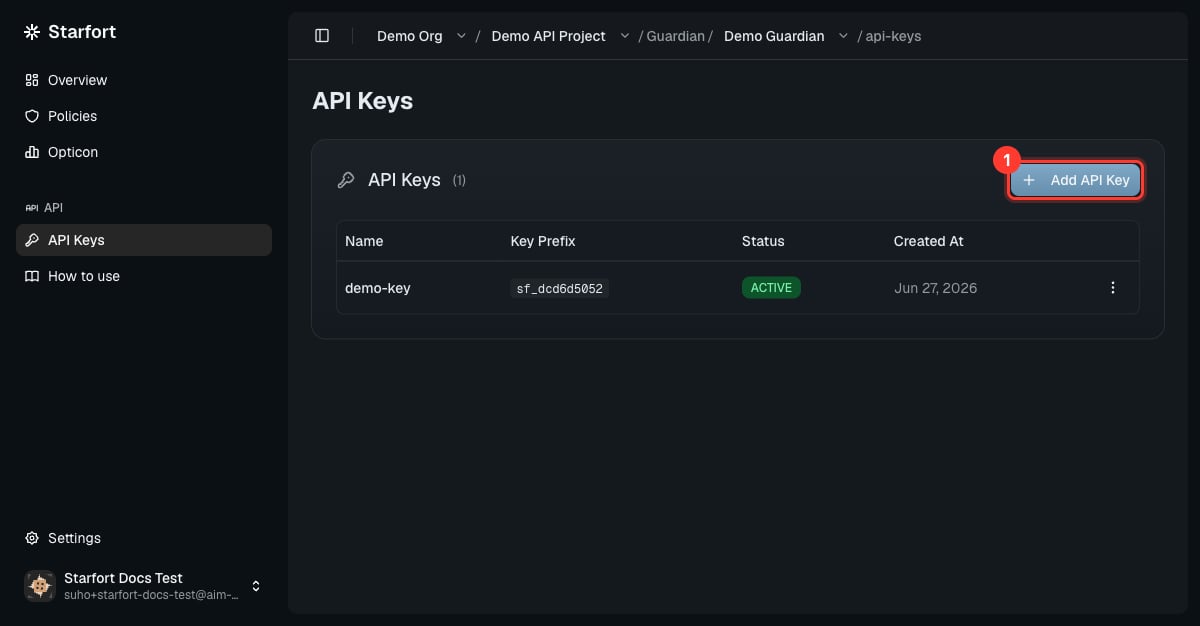
Open your Guardian → **API Keys** → **Add API Key**, give it a name, and **Create**.
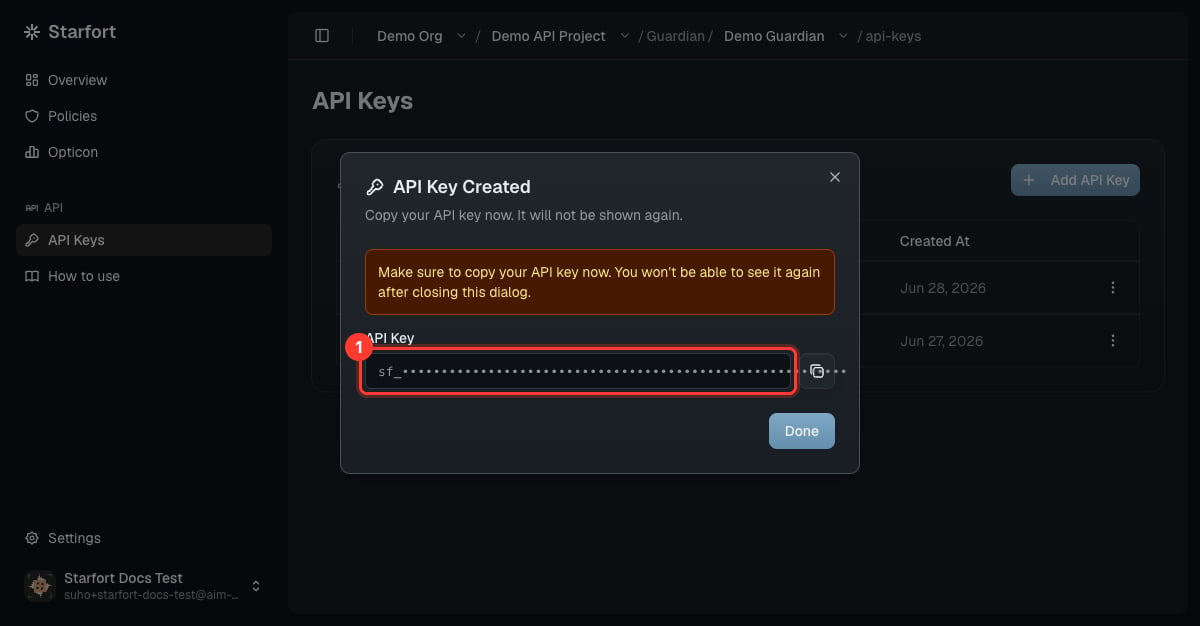
 The key is shown **once** in a confirmation dialog and starts with `sf_`. Copy it now — it cannot be retrieved later.
 Treat keys like passwords. The key's **name** appears as a tag on every [trace](/en/v1.2/admin/monitoring-opticon), so name keys by caller or environment (e.g. `prod-backend`). A key name must be **unique within the project** — across all of its Guardians' keys — so the name unambiguously identifies the caller in traces.
## Key lifecycle
| State | Meaning | Transitions |
| ------------ | ----------------------------------------------------- | ----------------------- |
| **Active** | Works normally. | → Inactive, → Revoked |
| **Inactive** | Temporarily disabled by an admin — calls are refused. | → Active, → Revoked |
| **Revoked** | Permanently disabled. | **None — irreversible** |
Active and Inactive toggle freely. **Revoke is permanent**: a revoked key can't be reactivated — issue a new key instead.
A call with a missing/invalid/revoked key gets **HTTP 401** — see [Authentication](/en/v1.2/api/authentication) and [Errors & states](/en/v1.2/api/errors).
## Key state vs. Kill Switch
A key's state and the [Kill Switch](/en/v1.2/admin/kill-switch) are **independent**, and Starfort checks both on **every request**:
* The Kill Switch (on the org, project, or Guardian) blocks traffic even for **Active** keys while it's on. Your keys keep their state and resume normally the moment it's cleared.
* While any Kill Switch above a Guardian is on, you also **can't create new keys** there.
Treat keys like passwords. The key's **name** appears as a tag on every [trace](/en/v1.2/admin/monitoring-opticon), so name keys by caller or environment (e.g. `prod-backend`). A key name must be **unique within the project** — across all of its Guardians' keys — so the name unambiguously identifies the caller in traces.
## Key lifecycle
| State | Meaning | Transitions |
| ------------ | ----------------------------------------------------- | ----------------------- |
| **Active** | Works normally. | → Inactive, → Revoked |
| **Inactive** | Temporarily disabled by an admin — calls are refused. | → Active, → Revoked |
| **Revoked** | Permanently disabled. | **None — irreversible** |
Active and Inactive toggle freely. **Revoke is permanent**: a revoked key can't be reactivated — issue a new key instead.
A call with a missing/invalid/revoked key gets **HTTP 401** — see [Authentication](/en/v1.2/api/authentication) and [Errors & states](/en/v1.2/api/errors).
## Key state vs. Kill Switch
A key's state and the [Kill Switch](/en/v1.2/admin/kill-switch) are **independent**, and Starfort checks both on **every request**:
* The Kill Switch (on the org, project, or Guardian) blocks traffic even for **Active** keys while it's on. Your keys keep their state and resume normally the moment it's cleared.
* While any Kill Switch above a Guardian is on, you also **can't create new keys** there.