> ## Documentation Index
> Fetch the complete documentation index at: https://docs.starfort.io/llms.txt
> Use this file to discover all available pages before exploring further.
# Audit log
> Review the immutable record of governance changes.
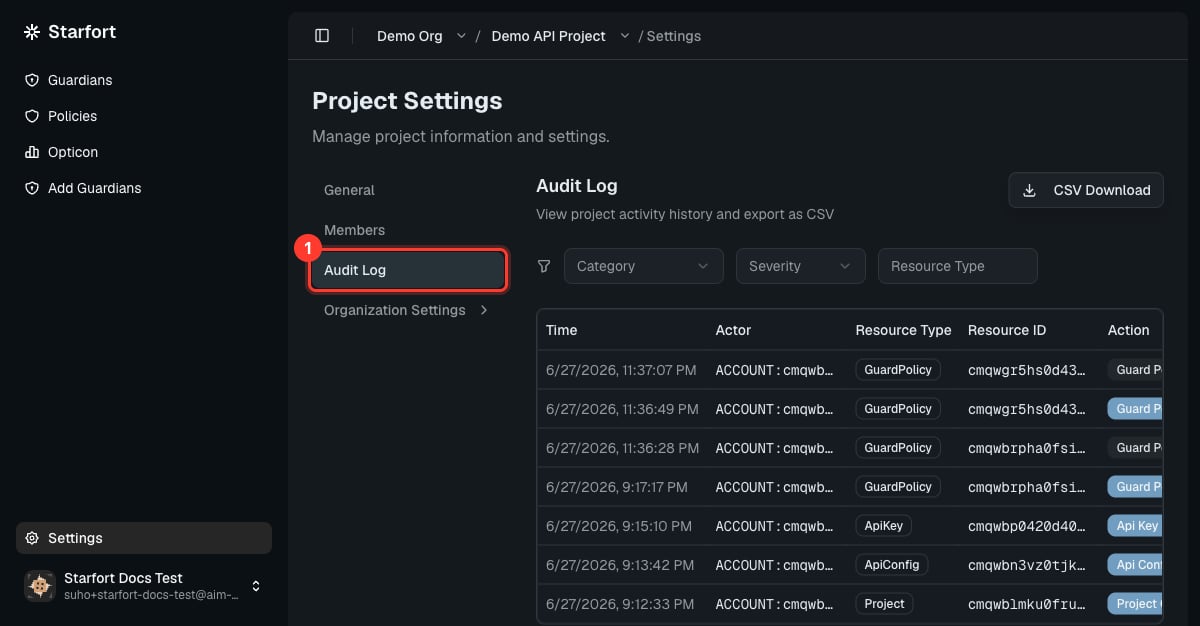
The **Audit Log** is an immutable record of **governance changes** — who changed what, and when. It is separate from [Opticon](/en/v1.2/admin/monitoring-opticon), which records runtime request/response traces.
Find it on a project's **Settings → Audit Log** tab.
 ## What it captures
* **Resource changes** — create / edit / delete / assign of organizations, projects, Guardians, policies, Control Profiles, and more.
* **Permission changes** — role grants, revokes, and team invitations.
* **Setting changes** — company, organization, and project settings.
* **Credential operations** — API-key creation and state transitions (Active ↔ Inactive / Revoked), Desktop Agent registration.
* **Emergency actions** — [Kill Switch](/en/v1.2/admin/kill-switch) on/off, Company Access Key rotation.
Each entry records the event type, the actor (account, company, role), the affected entity, before/after state where relevant, the timestamp, and the request source (IP, user agent).
## What it does not capture
* Plain reads and page navigation.
* Token operations (issuing, expiring, refreshing JWTs).
* Authentication and account-security events — login, logout, password change — those live in a separate security log.
* System-automated events such as heartbeats and health checks.
Per-request content and decisions are [Opticon traces](/en/v1.2/admin/monitoring-opticon), not Audit Log entries. Use the Audit Log for "who changed the configuration", and Opticon for "what happened to this request".
## Immutability and access
Audit Log entries are **immutable and kept permanently** — no role, not even a platform admin, can edit or delete them. Within a company, **every account can view the log** regardless of role or which organizations/projects they belong to; another company's log is never visible.
## What it captures
* **Resource changes** — create / edit / delete / assign of organizations, projects, Guardians, policies, Control Profiles, and more.
* **Permission changes** — role grants, revokes, and team invitations.
* **Setting changes** — company, organization, and project settings.
* **Credential operations** — API-key creation and state transitions (Active ↔ Inactive / Revoked), Desktop Agent registration.
* **Emergency actions** — [Kill Switch](/en/v1.2/admin/kill-switch) on/off, Company Access Key rotation.
Each entry records the event type, the actor (account, company, role), the affected entity, before/after state where relevant, the timestamp, and the request source (IP, user agent).
## What it does not capture
* Plain reads and page navigation.
* Token operations (issuing, expiring, refreshing JWTs).
* Authentication and account-security events — login, logout, password change — those live in a separate security log.
* System-automated events such as heartbeats and health checks.
Per-request content and decisions are [Opticon traces](/en/v1.2/admin/monitoring-opticon), not Audit Log entries. Use the Audit Log for "who changed the configuration", and Opticon for "what happened to this request".
## Immutability and access
Audit Log entries are **immutable and kept permanently** — no role, not even a platform admin, can edit or delete them. Within a company, **every account can view the log** regardless of role or which organizations/projects they belong to; another company's log is never visible.