> ## Documentation Index
> Fetch the complete documentation index at: https://docs.starfort.io/llms.txt
> Use this file to discover all available pages before exploring further.
# How to add, change, or remove an AI service for employees
> Manage which AI tools the Desktop Agent governs by editing Control Profiles.
Which AI tools your employees can use — and how they're governed — is controlled by [Control Profiles](/en/v1.2/admin/control-profiles). This recipe covers the everyday changes.
Open **Desktop Agent › Control Profile**. Starfort seeds profiles for common services (ChatGPT, Claude, Copilot, Gemini, Perplexity, …).
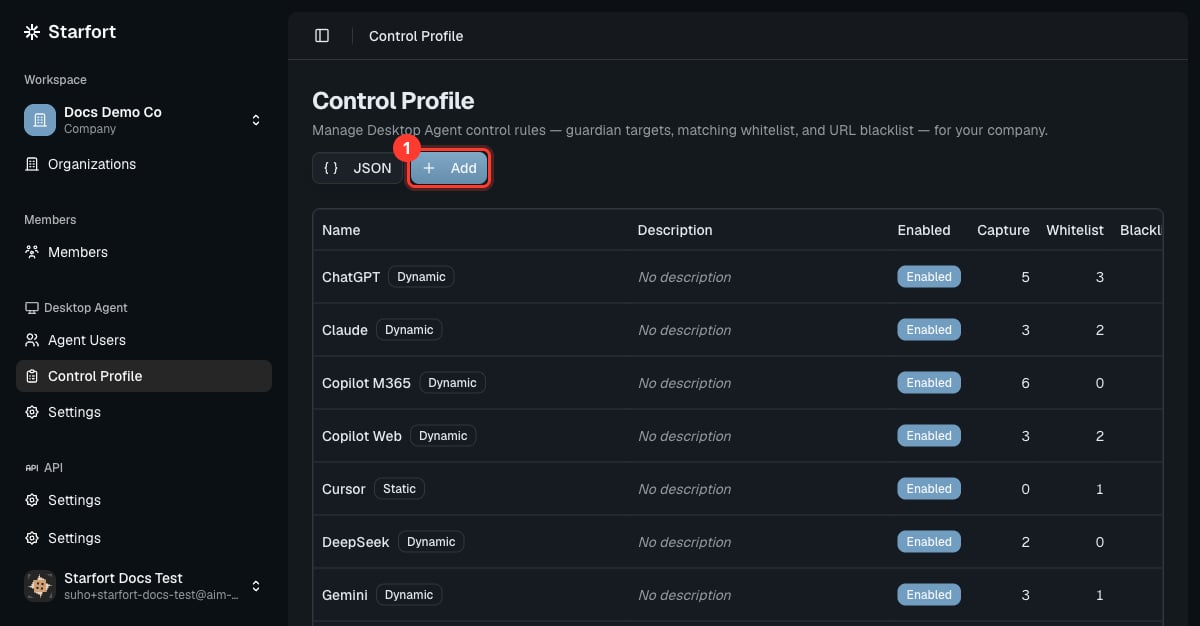 ## Add a new AI service
1. Choose **Add** and name the profile after the service.
2. Add its **Guardian targets** (the request URLs to intercept) so the Agent evaluates it. See [Add a customized Control Profile](/en/v1.2/admin/how-to/add-control-profile).
3. **Enable** it. Assigned Agents pick it up automatically.
## Change how a service is governed
Open the profile (or its row actions) and adjust the three mechanisms:
* **Allow more** — add a **matching whitelist** entry (e.g. a health-check or login endpoint).
* **Block outright** — add a **URL blacklist** entry.
* **Change what's inspected** — edit the **Guardian targets**.
Edits **cascade automatically** to every project and Guardian using the profile — there's no re-assign step (allow a short propagation time to devices).
## Remove / disable a service
* **Disable** the profile to stop governing the service without deleting your configuration (recommended — reversible). A disabled profile is skipped entirely at runtime: none of its rules run and **no Opticon trace is produced** for it.
* **Delete** the profile to remove it entirely — this also detaches it from every project and Guardian mapping automatically.
Disabling or removing a profile means the Agent no longer intercepts that service — requests are no longer masked or blocked. Prefer **disable** while testing.
## Add a new AI service
1. Choose **Add** and name the profile after the service.
2. Add its **Guardian targets** (the request URLs to intercept) so the Agent evaluates it. See [Add a customized Control Profile](/en/v1.2/admin/how-to/add-control-profile).
3. **Enable** it. Assigned Agents pick it up automatically.
## Change how a service is governed
Open the profile (or its row actions) and adjust the three mechanisms:
* **Allow more** — add a **matching whitelist** entry (e.g. a health-check or login endpoint).
* **Block outright** — add a **URL blacklist** entry.
* **Change what's inspected** — edit the **Guardian targets**.
Edits **cascade automatically** to every project and Guardian using the profile — there's no re-assign step (allow a short propagation time to devices).
## Remove / disable a service
* **Disable** the profile to stop governing the service without deleting your configuration (recommended — reversible). A disabled profile is skipped entirely at runtime: none of its rules run and **no Opticon trace is produced** for it.
* **Delete** the profile to remove it entirely — this also detaches it from every project and Guardian mapping automatically.
Disabling or removing a profile means the Agent no longer intercepts that service — requests are no longer masked or blocked. Prefer **disable** while testing.