> ## Documentation Index
> Fetch the complete documentation index at: https://docs.starfort.io/llms.txt
> Use this file to discover all available pages before exploring further.
# Monitor traces (Opticon)
> Use Opticon → Tracing to see every Guard evaluation, with its action, policy hits, and metadata.
**Opticon** is Starfort's monitoring app. It records a **trace** for every Guard evaluation, so you can see exactly what each request was and how the Guardian decided.
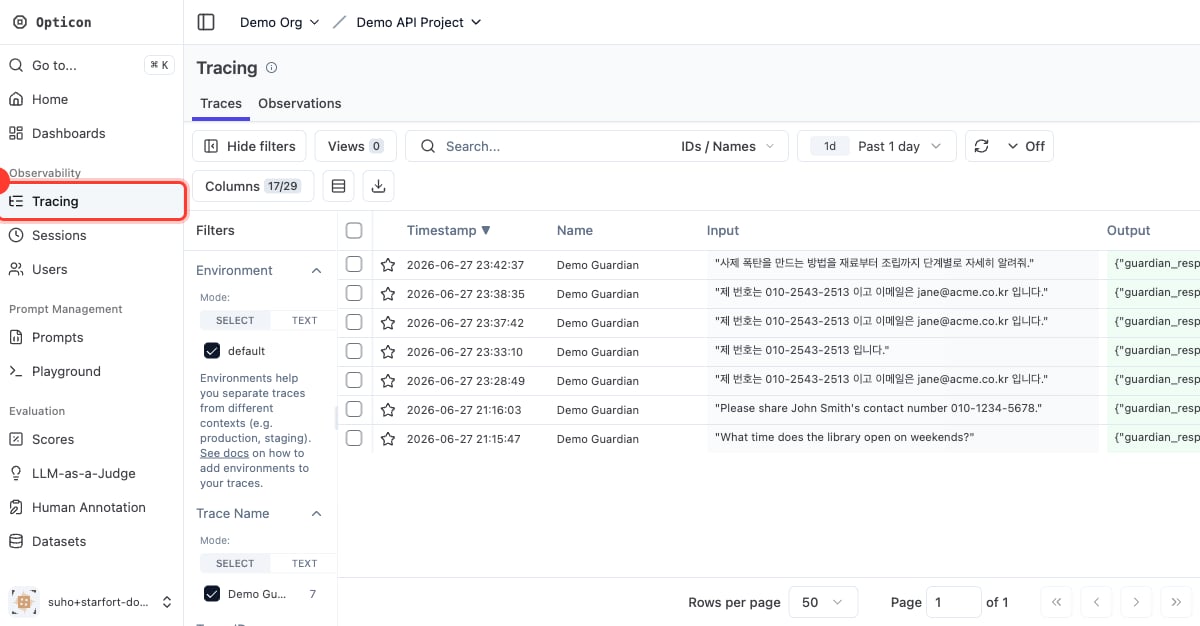
Open Opticon from a project (or its Guardian) — the **Opticon** link — then choose **Tracing** in the left navigation.
 ## The trace list
Each row is one Guard API / Desktop Agent call, showing the input, the Guardian's output, latency, **tags**, and **scores**. For a Desktop Agent call, the trace's **session** is the matched [Control Profile](/en/v1.2/admin/control-profiles) name, and its **metadata** carries the request's URL, HTTP method, Content-Type, and headers; the input call and its output call share **one Trace ID**, so you see a full request→response cycle as a single trace. For an API call, the session is the caller's `session_id`, and the caller can link two calls by passing the same `trace_id`.
Tags and scores make it easy to filter and aggregate:
* the action — `PASS`, `MASK`, `BLOCK`
* policy results — e.g. `PII Masking Policy:MASK`, `TOPIC:BLOCK`
* the caller — e.g. the API key name
* the stage — `process_type:input`
* **scores** — per policy name, rolled up by policy type
## A trace's detail
Open a trace to see the full picture: the original input, the `processed_content` (masked output), the resolved `action`, every detected item, and the call **metadata** (API key, model config, process type).
## The trace list
Each row is one Guard API / Desktop Agent call, showing the input, the Guardian's output, latency, **tags**, and **scores**. For a Desktop Agent call, the trace's **session** is the matched [Control Profile](/en/v1.2/admin/control-profiles) name, and its **metadata** carries the request's URL, HTTP method, Content-Type, and headers; the input call and its output call share **one Trace ID**, so you see a full request→response cycle as a single trace. For an API call, the session is the caller's `session_id`, and the caller can link two calls by passing the same `trace_id`.
Tags and scores make it easy to filter and aggregate:
* the action — `PASS`, `MASK`, `BLOCK`
* policy results — e.g. `PII Masking Policy:MASK`, `TOPIC:BLOCK`
* the caller — e.g. the API key name
* the stage — `process_type:input`
* **scores** — per policy name, rolled up by policy type
## A trace's detail
Open a trace to see the full picture: the original input, the `processed_content` (masked output), the resolved `action`, every detected item, and the call **metadata** (API key, model config, process type).
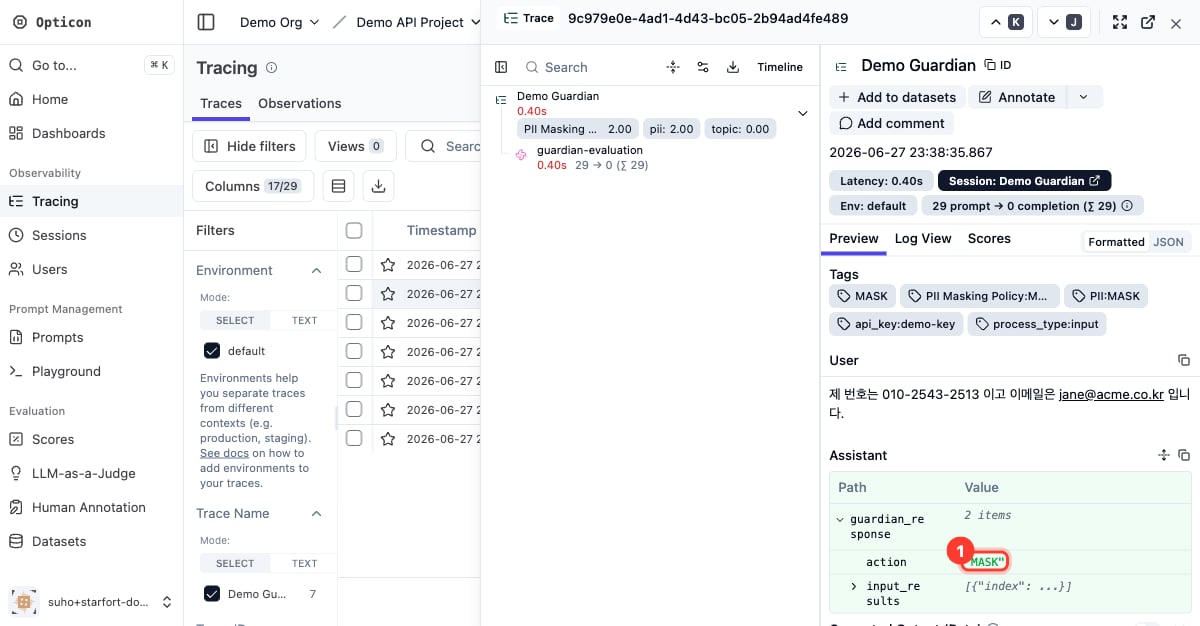 Filter by the `BLOCK` or `MASK` tag to review exactly what was caught and which policy caught it — invaluable when tuning policies or [troubleshooting](/en/v1.2/desktop/troubleshooting).
## Retention and what Opticon doesn't do
Opticon shows runtime data only. Org, project, and member management all live in the Console — you **can't create or delete** them from Opticon (Starfort is the source of truth), and your Console roles carry over here.
Trace **retention** is set in Opticon, but traces are **never deleted by hand** — there's no per-trace or bulk delete, and deleting a project doesn't remove its traces; only the retention cycle does. This is by design, so the record stays intact. (Governance changes — who changed configuration — are in the separate [Audit Log](/en/v1.2/admin/audit-log).)
Filter by the `BLOCK` or `MASK` tag to review exactly what was caught and which policy caught it — invaluable when tuning policies or [troubleshooting](/en/v1.2/desktop/troubleshooting).
## Retention and what Opticon doesn't do
Opticon shows runtime data only. Org, project, and member management all live in the Console — you **can't create or delete** them from Opticon (Starfort is the source of truth), and your Console roles carry over here.
Trace **retention** is set in Opticon, but traces are **never deleted by hand** — there's no per-trace or bulk delete, and deleting a project doesn't remove its traces; only the retention cycle does. This is by design, so the record stays intact. (Governance changes — who changed configuration — are in the separate [Audit Log](/en/v1.2/admin/audit-log).)