> ## Documentation Index
> Fetch the complete documentation index at: https://docs.starfort.io/llms.txt
> Use this file to discover all available pages before exploring further.
# Console overview
> A tour of the Starfort admin Console: where everything lives in the navigation.
The Starfort Console (**cloud.starfort.io**) is where administrators configure governance. This page maps the navigation; the rest of this section covers each area in depth.
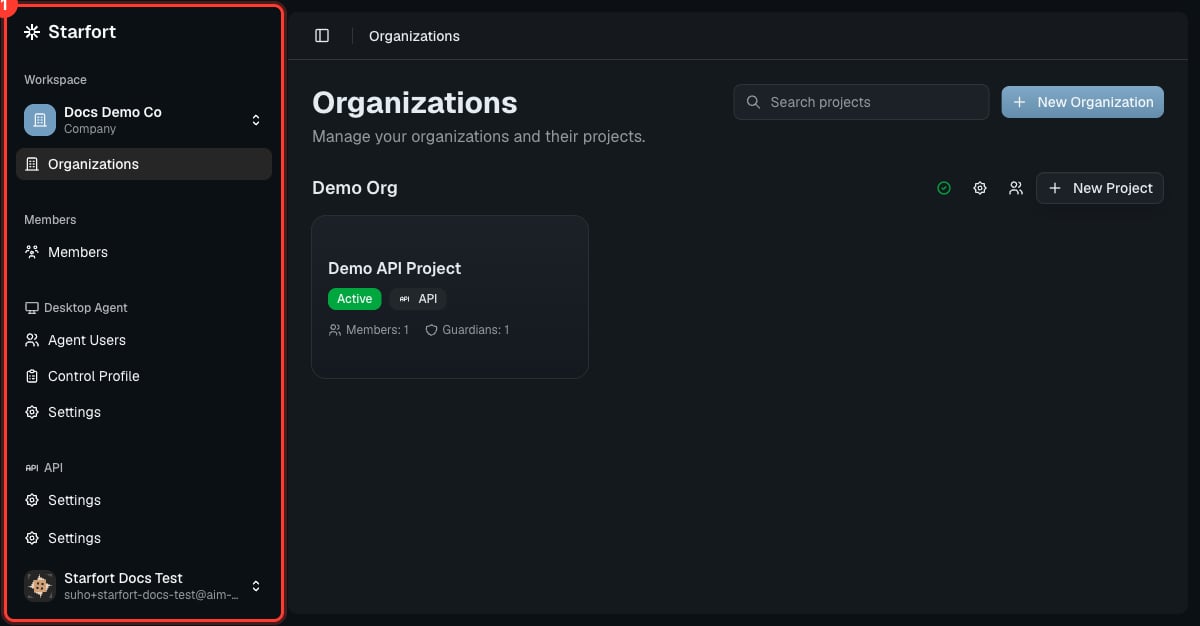 ## Navigation map
| Area | What's there |
| ----------------------------------- | ------------------------------------------------------------------------------------------------------------------- |
| **Workspace › Organizations** | Your organizations and their [projects](/en/v1.2/admin/organizations-projects). The company switcher is at the top. |
| **Members** | People in the company and their roles. |
| **Desktop Agent › Agent Users** | Employees registered to run the [Desktop Agent](/en/v1.2/admin/agent-users). |
| **Desktop Agent › Control Profile** | The AI services the Agent governs — [Control Profiles](/en/v1.2/admin/control-profiles). |
| **Desktop Agent › Settings** | Company Desktop Agent config — [fail-safe, access key](/en/v1.2/admin/desktop-agent-settings). |
| **API › Settings** | Account-level API settings. |
| **Settings** | Account and company settings. |
The Desktop Agent and API areas appear **only when that feature is enabled** for the company (set at [signup](/en/v1.2/admin/quickstart#3-choose-features) and editable in Company Settings). If you belong to more than one company, the **company switcher** at the top picks which one you're administering — you choose it at login.
## Inside a project
Open a project to manage its [Guardians](/en/v1.2/admin/register-guardian). Each Guardian has its own tabs: **Overview**, **Policies**, **API Keys**, **How to use**, **Settings**, and a link to **Opticon** monitoring. A project's **Settings** also hold its [Audit Log](/en/v1.2/admin/audit-log) and the [Kill Switch](/en/v1.2/admin/kill-switch) (Danger Zone).
## Where to go next
Set everything up end to end.
## Navigation map
| Area | What's there |
| ----------------------------------- | ------------------------------------------------------------------------------------------------------------------- |
| **Workspace › Organizations** | Your organizations and their [projects](/en/v1.2/admin/organizations-projects). The company switcher is at the top. |
| **Members** | People in the company and their roles. |
| **Desktop Agent › Agent Users** | Employees registered to run the [Desktop Agent](/en/v1.2/admin/agent-users). |
| **Desktop Agent › Control Profile** | The AI services the Agent governs — [Control Profiles](/en/v1.2/admin/control-profiles). |
| **Desktop Agent › Settings** | Company Desktop Agent config — [fail-safe, access key](/en/v1.2/admin/desktop-agent-settings). |
| **API › Settings** | Account-level API settings. |
| **Settings** | Account and company settings. |
The Desktop Agent and API areas appear **only when that feature is enabled** for the company (set at [signup](/en/v1.2/admin/quickstart#3-choose-features) and editable in Company Settings). If you belong to more than one company, the **company switcher** at the top picks which one you're administering — you choose it at login.
## Inside a project
Open a project to manage its [Guardians](/en/v1.2/admin/register-guardian). Each Guardian has its own tabs: **Overview**, **Policies**, **API Keys**, **How to use**, **Settings**, and a link to **Opticon** monitoring. A project's **Settings** also hold its [Audit Log](/en/v1.2/admin/audit-log) and the [Kill Switch](/en/v1.2/admin/kill-switch) (Danger Zone).
## Where to go next
Set everything up end to end.