> ## Documentation Index
> Fetch the complete documentation index at: https://docs.starfort.io/llms.txt
> Use this file to discover all available pages before exploring further.
# Test policies (Forge)
> Register a Test Dataset per Project Guardian, run Experiments, and measure how accurately your Guard Policies decide PASS / MASK / BLOCK.
**Forge** is Starfort's policy-testing feature, new in v1.3. It answers a question v1.2 couldn't: *does my Guard Policy actually decide the way I expect?* You register a **Test Dataset** — inputs paired with the verdict each one *should* get — run an **Experiment** against a Project Guardian, and get an **accuracy score** per action class. Failed cases become the signal for improving the policy by hand.
 Forge measures and visualizes — it never edits policies for you. Evaluation is a deterministic comparison of expected vs. actual actions (no LLM judging), and policy fixes go through the normal [Guard Policy editing and versioning](/en/v1.3/admin/author-guard-policy) flow.
## Test Datasets
A **Test Dataset** belongs to a **Project Guardian** (the thing whose policies you're testing). One Guardian can have several datasets — for example "PII attack patterns," "normal inputs," and "edge cases." Dataset names are unique within their Guardian, and deleting the Guardian deletes its datasets and all their results.
Each **item** in a dataset has two parts:
| Part | What it is |
| -------------------- | ------------------------------------------------------------------------------------------------------------------------------------------------------------------------- |
| **Input** | The content to send to the Guardian — a multi-turn conversation (an ordered array of user / assistant messages). v1.3 supports **text only**. |
| **Expected verdict** | The decision the Guardian *should* return — the final **action** (`PASS` / `MASK` / `BLOCK`), optionally with the policy codes that should fire and a free-text `reason`. |
Evaluation in v1.3 compares **the final action only**. The policy codes and reason are stored with every result for failure analysis, but they don't affect the score.
### Register a dataset
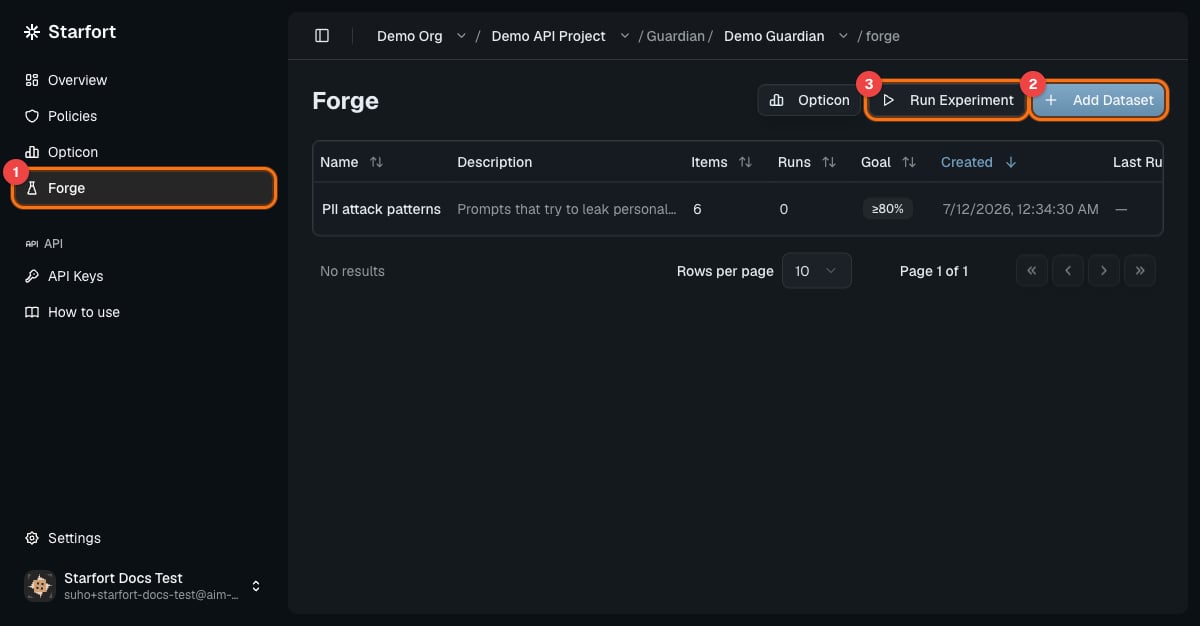
In the project's Guardian, open **Forge** and create a dataset:
The name must be unique within this Project Guardian.
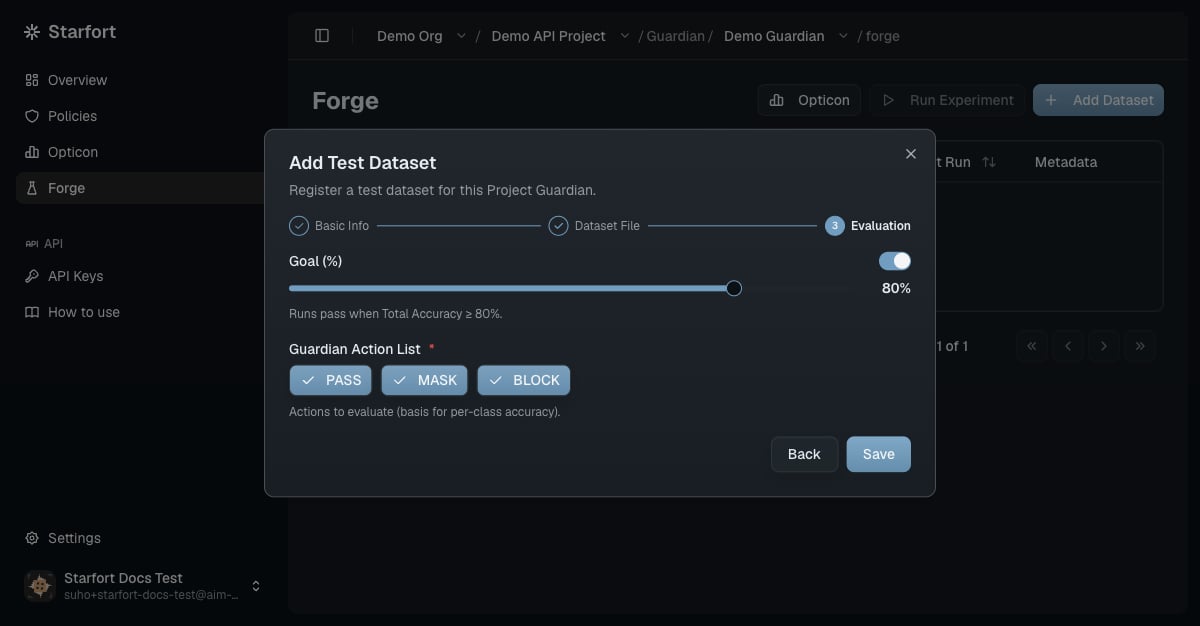
The set of actions this dataset evaluates (e.g. Pass / Mask / Block) — per-class accuracy is computed for these.
A CSV or JSONL file — each record is one item (`input` + `expected_output`).
An accuracy target from 0–100%. When set, every Experiment on this dataset gets a **PASS / FAIL** verdict: Total Accuracy ≥ Goal passes.
Forge measures and visualizes — it never edits policies for you. Evaluation is a deterministic comparison of expected vs. actual actions (no LLM judging), and policy fixes go through the normal [Guard Policy editing and versioning](/en/v1.3/admin/author-guard-policy) flow.
## Test Datasets
A **Test Dataset** belongs to a **Project Guardian** (the thing whose policies you're testing). One Guardian can have several datasets — for example "PII attack patterns," "normal inputs," and "edge cases." Dataset names are unique within their Guardian, and deleting the Guardian deletes its datasets and all their results.
Each **item** in a dataset has two parts:
| Part | What it is |
| -------------------- | ------------------------------------------------------------------------------------------------------------------------------------------------------------------------- |
| **Input** | The content to send to the Guardian — a multi-turn conversation (an ordered array of user / assistant messages). v1.3 supports **text only**. |
| **Expected verdict** | The decision the Guardian *should* return — the final **action** (`PASS` / `MASK` / `BLOCK`), optionally with the policy codes that should fire and a free-text `reason`. |
Evaluation in v1.3 compares **the final action only**. The policy codes and reason are stored with every result for failure analysis, but they don't affect the score.
### Register a dataset
In the project's Guardian, open **Forge** and create a dataset:
The name must be unique within this Project Guardian.
The set of actions this dataset evaluates (e.g. Pass / Mask / Block) — per-class accuracy is computed for these.
A CSV or JSONL file — each record is one item (`input` + `expected_output`).
An accuracy target from 0–100%. When set, every Experiment on this dataset gets a **PASS / FAIL** verdict: Total Accuracy ≥ Goal passes.
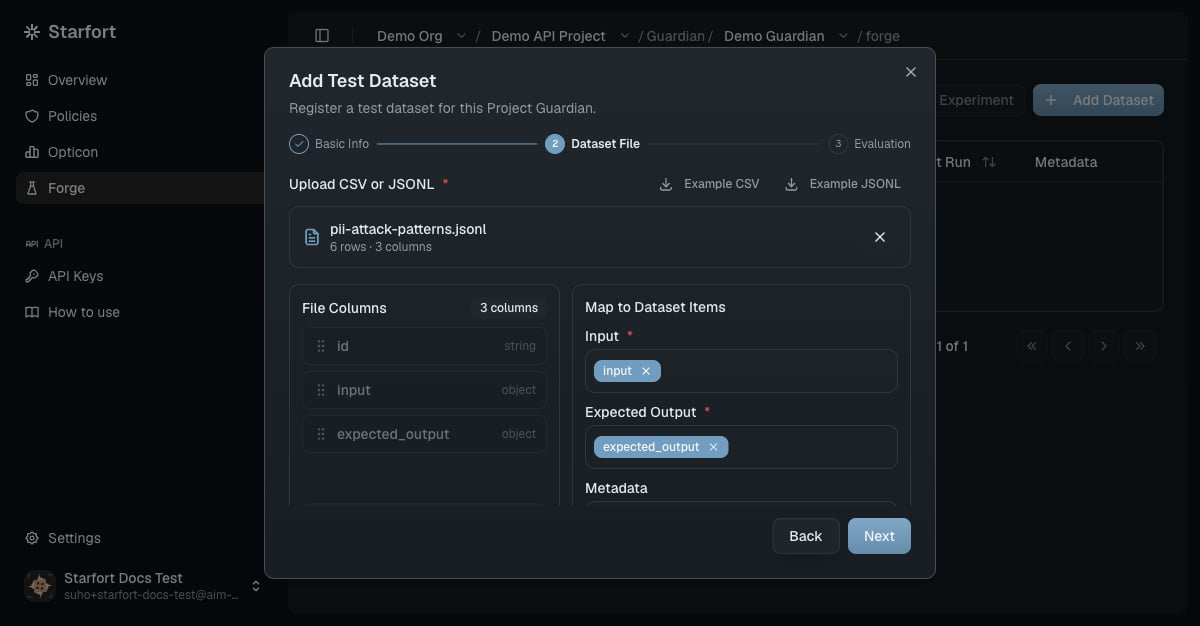
 Datasets are versioned: editing or re-uploading creates a new version and keeps the old ones, and an Experiment can run against any version (latest by default).
## Experiments
An **Experiment** runs one Test Dataset through the Project Guardian with a **policy configuration** you choose, and scores the results. You configure:
| Input | Notes |
| ------------------------------- | ----------------------------------------------------------------------------------------------------------------------------------------------------------------------------------------------------------------------------- |
| **Dataset** (+ version) | The dataset fixes the target Guardian, the Goal, and the Action List. Version defaults to latest. |
| **Name / description** | Optional — unnamed Experiments are auto-named from the process type and policy configuration. |
| **Policies** | One or more **distinct** policies, each pinned to **one version** (defaults to its latest). You can't pick the same policy twice — to compare versions of one policy, run separate Experiments and compare them side by side. |
| **Process type & model config** | One process type supported by the Guardian (defaults to the first); the model config is pre-filled from the Guardian's settings and can be overridden for this run only. |
Datasets are versioned: editing or re-uploading creates a new version and keeps the old ones, and an Experiment can run against any version (latest by default).
## Experiments
An **Experiment** runs one Test Dataset through the Project Guardian with a **policy configuration** you choose, and scores the results. You configure:
| Input | Notes |
| ------------------------------- | ----------------------------------------------------------------------------------------------------------------------------------------------------------------------------------------------------------------------------- |
| **Dataset** (+ version) | The dataset fixes the target Guardian, the Goal, and the Action List. Version defaults to latest. |
| **Name / description** | Optional — unnamed Experiments are auto-named from the process type and policy configuration. |
| **Policies** | One or more **distinct** policies, each pinned to **one version** (defaults to its latest). You can't pick the same policy twice — to compare versions of one policy, run separate Experiments and compare them side by side. |
| **Process type & model config** | One process type supported by the Guardian (defaults to the first); the model config is pre-filled from the Guardian's settings and can be overridden for this run only. |
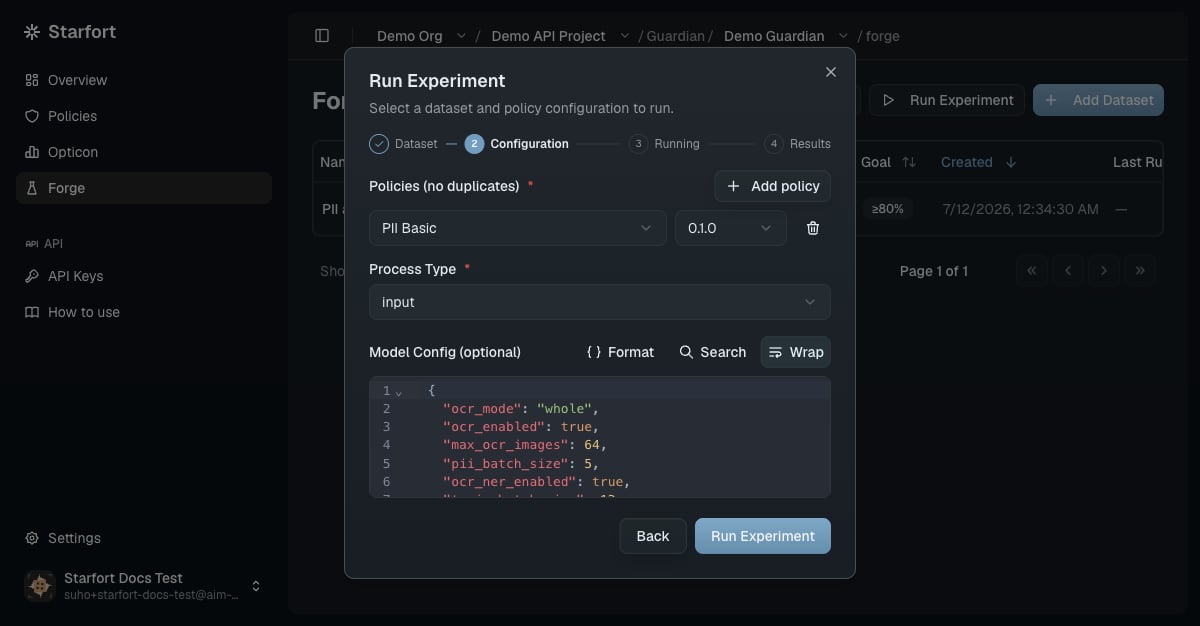 Runs are **synchronous**: the run blocks until it finishes (`RUNNING` → `COMPLETED` or `ERROR`), then shows its results. Results, traces, and scores are kept permanently, so you can revisit any past Experiment.
### How results are scored
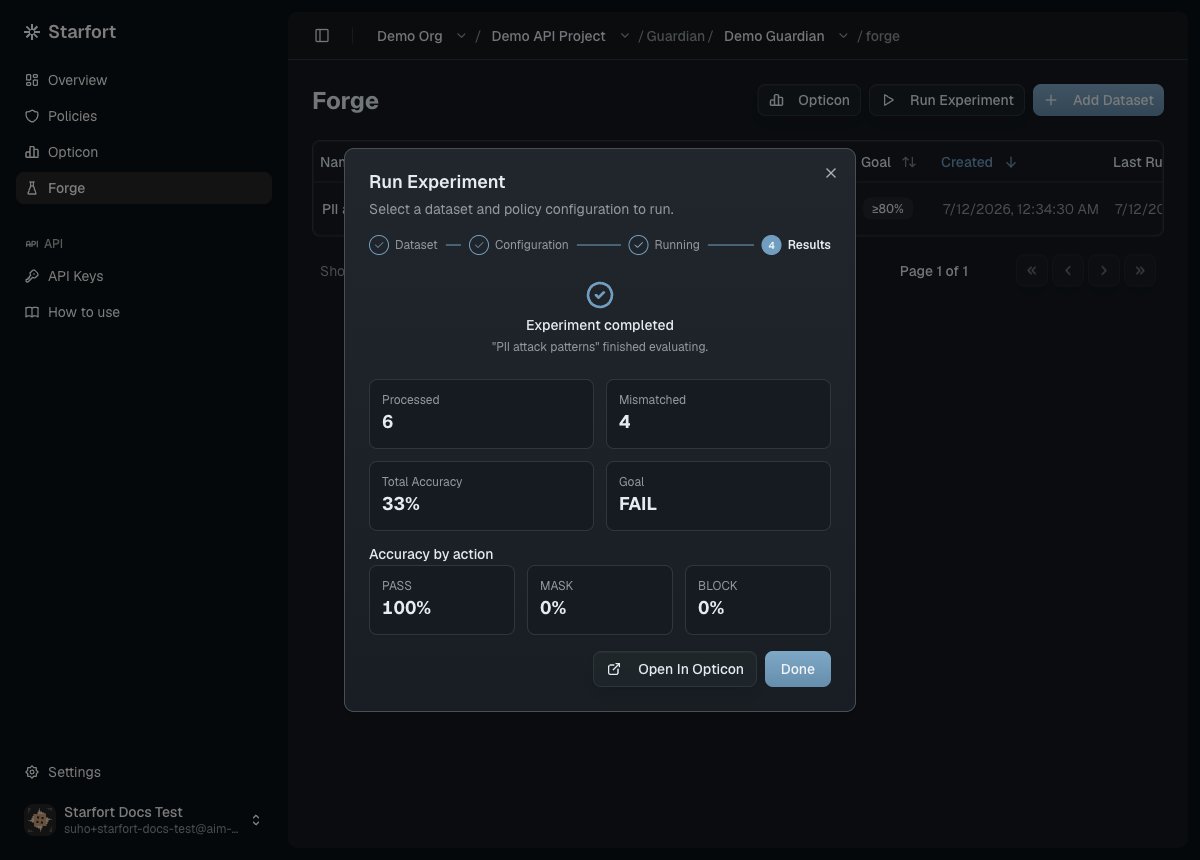
Every item is judged the moment its response arrives: expected action vs. actual action, right or wrong. The Experiment then reports:
* **Total Accuracy** — items whose action matched, over all items.
* **Pass / Mask / Block Accuracy** — per expected-action class, for the classes in the dataset's Action List.
* **PASS / FAIL** — only if the dataset has a Goal: Total Accuracy ≥ Goal passes.
Runs are **synchronous**: the run blocks until it finishes (`RUNNING` → `COMPLETED` or `ERROR`), then shows its results. Results, traces, and scores are kept permanently, so you can revisit any past Experiment.
### How results are scored
Every item is judged the moment its response arrives: expected action vs. actual action, right or wrong. The Experiment then reports:
* **Total Accuracy** — items whose action matched, over all items.
* **Pass / Mask / Block Accuracy** — per expected-action class, for the classes in the dataset's Action List.
* **PASS / FAIL** — only if the dataset has a Goal: Total Accuracy ≥ Goal passes.
 ### Where results live
Experiment traces are recorded in [Opticon](/en/v1.3/admin/monitoring-opticon) — organized as *Guardian › dataset › Experiment* — and kept strictly apart from production traffic: they're tagged with the **`forge` environment** (production traces are `default`), the Experiment name as the **session**, and the dataset name as the **user ID**. Your PASS / MASK / BLOCK production metrics are never polluted by test runs, and you can filter to exactly one Experiment's traces. Starfort's own Experiment history shows only runs triggered from Forge.
## Improve a policy from failures
Forge closes the loop that used to require analyzing production traffic after the fact:
In a low-accuracy Experiment, open the failed items (accuracy = 0) and inspect each trace — input, expected action, actual action.
Look for the pattern: a missing PII category, an over- or under-triggering topic.
Fix the Guard Policy and publish a new version — the normal [editing and versioning](/en/v1.3/admin/how-to/version-and-apply-policy) flow.
Run a new Experiment on the same dataset with the new version. Side-by-side runs show the accuracy delta — and catch regressions before they reach production traffic.
## Permissions
| Action | Required |
| ----------------------------------------- | ------------------------------------------------------ |
| View datasets & Experiments | Project Member or above |
| Register / edit datasets, run Experiments | The **`test-execute`** IAM permission |
| Delete datasets | Project Admin or above |
| Edit & apply Guard Policies | Project Admin or above (same as normal policy editing) |
v1.3 Forge is text-only and rule-based by design: file/image datasets, LLM-as-judge evaluation, and automatic policy optimization are out of scope for this version.
### Where results live
Experiment traces are recorded in [Opticon](/en/v1.3/admin/monitoring-opticon) — organized as *Guardian › dataset › Experiment* — and kept strictly apart from production traffic: they're tagged with the **`forge` environment** (production traces are `default`), the Experiment name as the **session**, and the dataset name as the **user ID**. Your PASS / MASK / BLOCK production metrics are never polluted by test runs, and you can filter to exactly one Experiment's traces. Starfort's own Experiment history shows only runs triggered from Forge.
## Improve a policy from failures
Forge closes the loop that used to require analyzing production traffic after the fact:
In a low-accuracy Experiment, open the failed items (accuracy = 0) and inspect each trace — input, expected action, actual action.
Look for the pattern: a missing PII category, an over- or under-triggering topic.
Fix the Guard Policy and publish a new version — the normal [editing and versioning](/en/v1.3/admin/how-to/version-and-apply-policy) flow.
Run a new Experiment on the same dataset with the new version. Side-by-side runs show the accuracy delta — and catch regressions before they reach production traffic.
## Permissions
| Action | Required |
| ----------------------------------------- | ------------------------------------------------------ |
| View datasets & Experiments | Project Member or above |
| Register / edit datasets, run Experiments | The **`test-execute`** IAM permission |
| Delete datasets | Project Admin or above |
| Edit & apply Guard Policies | Project Admin or above (same as normal policy editing) |
v1.3 Forge is text-only and rule-based by design: file/image datasets, LLM-as-judge evaluation, and automatic policy optimization are out of scope for this version.