> ## Documentation Index
> Fetch the complete documentation index at: https://docs.starfort.io/llms.txt
> Use this file to discover all available pages before exploring further.
# Use the Kill Switch
> Immediately block all traffic for a Starfort project in an emergency, then recover safely with audit records and re-enable steps (Starfort v1.4 docs)
The **Kill Switch** is an emergency control that immediately blocks traffic beneath the level it's activated on. Use it when you need to stop AI usage right now — for example a suspected data leak.
It exists at **three levels** — **Organization**, **Project**, and **[module instance](/en/v1.4/concepts/module-instances) (Project Guardian · Project Stratum)** — each an independent on/off toggle (the company itself has none). If **any** level is on, all traffic beneath it is blocked.
v1.4 generalizes the former Project Guardian level to the **module instance** level: you can now emergency-stop one module — say, just the [Stratum](/en/v1.4/concepts/stratum) instance — without stopping the whole project. The Kill Switch is strictly for emergencies; module instances have no everyday enable/disable toggle. A planned stop is expressed by removing the instance, and running without classification by leaving no policy pinned.
Only **Owners** can toggle the Kill Switch: a Company Owner over everything below, an Org Owner over their organization, a Project Owner over their project and its Guardians. Admins, Members, and Viewers cannot.
## Activate
Open the project's **Settings → General → Danger Zone** and choose **Activate Kill Switch**.
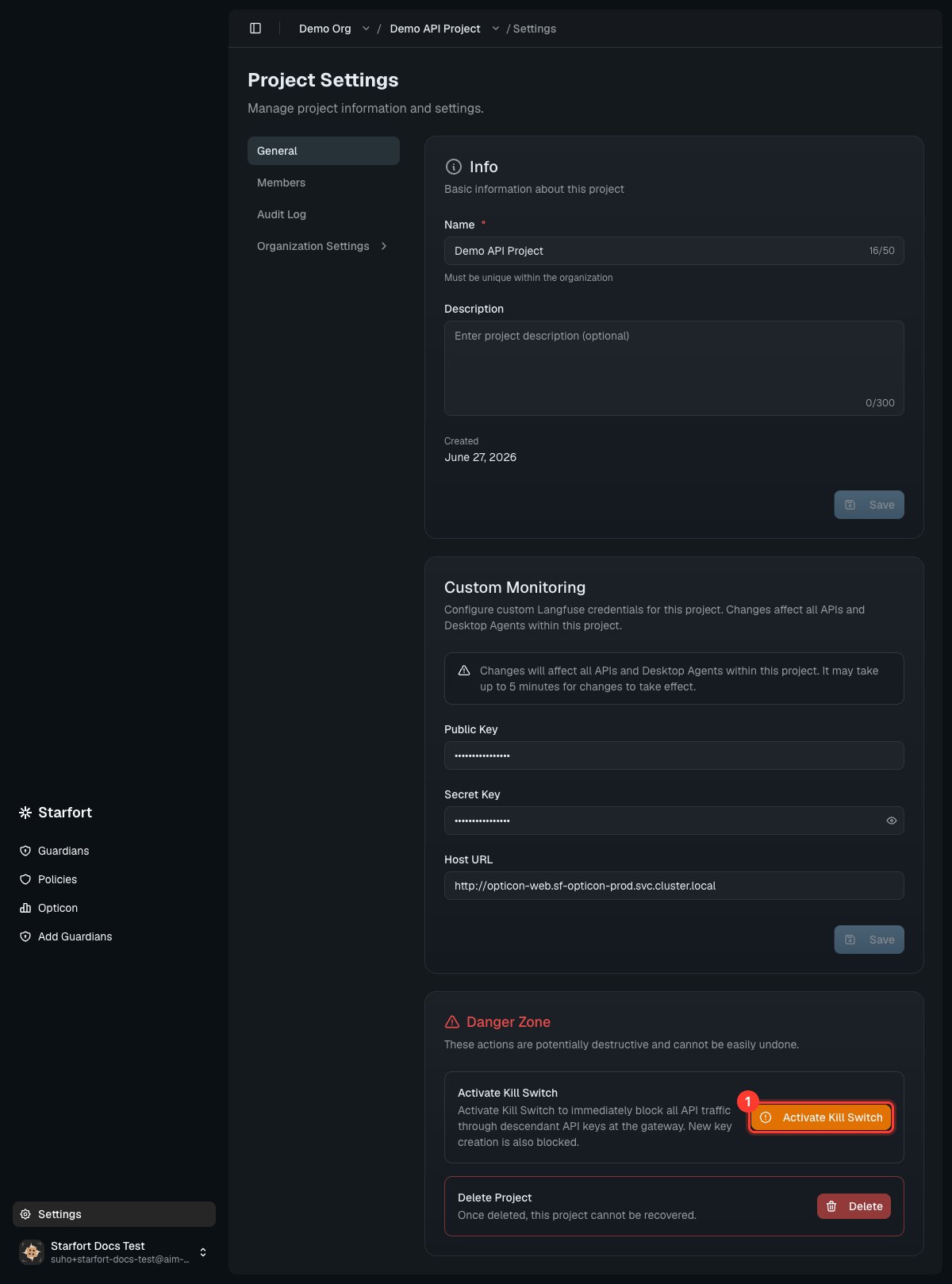 While active:
* All traffic beneath it is blocked at the gateway — **even for Active [API keys](/en/v1.4/admin/api-keys)**. Key states are left untouched and resume the moment you clear the switch (the two are independent, checked separately on every request).
* New API-key creation is blocked anywhere beneath an active switch.
* Desktop Agents under the level receive the blocked response and stop the outbound request to the AI service.
Callers receive a **single blocked response** (see [Errors & states](/en/v1.4/api/errors)) that deliberately **doesn't reveal which level or resource fired** — that detail goes only to the [Audit Log](/en/v1.4/admin/audit-log) and [Opticon](/en/v1.4/admin/monitoring-opticon). Activation and deactivation are recorded in the Audit Log; blocked attempts while it's on are **not** logged there (only real changes are).
## How it plays out on the batch paths
On the real-time path, request, inspection, and outbound delivery are fused into one call, so activation blocks requests inline and immediately. On the [batch paths](/en/v1.4/api/batch/overview), intake and completion are separated in time — so the same goal (immediate containment) is enforced differently per path. An activation at any tier propagates to the batch paths beneath it.
**Stratum grading batch — external-transfer freeze.** Classification is internal analysis and creates no external exposure by itself, so instead of halting the classification work, Starfort freezes the outbound gate:
| Batch lifecycle stage | While the switch is on |
| --------------------------------------------- | --------------------------------------------------------------------------------------------------------------------------------------------------------------- |
| New batch intake | Rejected — blocked at the intake gate |
| Queued and in-progress classification | Runs to completion; results are preserved |
| Completed verdicts awaiting external transfer | **External transfer frozen** — even documents graded "cleared for external transfer" are not sent out |
| Secondary review | Human approval is an internal act and may proceed, but transfers confirmed by approval are frozen too |
| Deactivation | Resumes immediately from the preserved results — classification already ran to completion, so only the transfer approval gate reopens; nothing is re-classified |
**S3 de-identification batch — immediate stop, no output.** This batch's output *is* the write to customer storage (`tgt`), so continuing to process means continuing to export. It stops rather than freezes:
| Batch lifecycle stage | While the switch is on |
| ------------------------------- | -------------------------------------------------------------------------------------------------------------------------- |
| New intake | Rejected |
| Waiting jobs (`PENDING`) | Not executed — finalized as failed (reason: Kill Switch) |
| In-progress jobs (`PROCESSING`) | **Stopped immediately** — finalized as failed, no output written |
| Job status queries | Blocked while the switch is on |
| Already-completed jobs | Outputs already written to `tgt` are not retroactively recalled — past the point of writing, that's the customer's storage |
Reprocessing after deactivation is a re-submission of the same `src` — de-identification reproduces identically on re-run, so there is no notion of resuming a stopped job.
## Recover
Deactivate the Kill Switch from the same Danger Zone. Traffic resumes normally — the switch doesn't change your policies or keys, it only gates traffic while active.
The Kill Switch is deliberately blunt: it blocks **everything** beneath it, not a single rule. For targeted changes, edit the relevant [Guard Policy](/en/v1.4/admin/author-guard-policy) instead.
While active:
* All traffic beneath it is blocked at the gateway — **even for Active [API keys](/en/v1.4/admin/api-keys)**. Key states are left untouched and resume the moment you clear the switch (the two are independent, checked separately on every request).
* New API-key creation is blocked anywhere beneath an active switch.
* Desktop Agents under the level receive the blocked response and stop the outbound request to the AI service.
Callers receive a **single blocked response** (see [Errors & states](/en/v1.4/api/errors)) that deliberately **doesn't reveal which level or resource fired** — that detail goes only to the [Audit Log](/en/v1.4/admin/audit-log) and [Opticon](/en/v1.4/admin/monitoring-opticon). Activation and deactivation are recorded in the Audit Log; blocked attempts while it's on are **not** logged there (only real changes are).
## How it plays out on the batch paths
On the real-time path, request, inspection, and outbound delivery are fused into one call, so activation blocks requests inline and immediately. On the [batch paths](/en/v1.4/api/batch/overview), intake and completion are separated in time — so the same goal (immediate containment) is enforced differently per path. An activation at any tier propagates to the batch paths beneath it.
**Stratum grading batch — external-transfer freeze.** Classification is internal analysis and creates no external exposure by itself, so instead of halting the classification work, Starfort freezes the outbound gate:
| Batch lifecycle stage | While the switch is on |
| --------------------------------------------- | --------------------------------------------------------------------------------------------------------------------------------------------------------------- |
| New batch intake | Rejected — blocked at the intake gate |
| Queued and in-progress classification | Runs to completion; results are preserved |
| Completed verdicts awaiting external transfer | **External transfer frozen** — even documents graded "cleared for external transfer" are not sent out |
| Secondary review | Human approval is an internal act and may proceed, but transfers confirmed by approval are frozen too |
| Deactivation | Resumes immediately from the preserved results — classification already ran to completion, so only the transfer approval gate reopens; nothing is re-classified |
**S3 de-identification batch — immediate stop, no output.** This batch's output *is* the write to customer storage (`tgt`), so continuing to process means continuing to export. It stops rather than freezes:
| Batch lifecycle stage | While the switch is on |
| ------------------------------- | -------------------------------------------------------------------------------------------------------------------------- |
| New intake | Rejected |
| Waiting jobs (`PENDING`) | Not executed — finalized as failed (reason: Kill Switch) |
| In-progress jobs (`PROCESSING`) | **Stopped immediately** — finalized as failed, no output written |
| Job status queries | Blocked while the switch is on |
| Already-completed jobs | Outputs already written to `tgt` are not retroactively recalled — past the point of writing, that's the customer's storage |
Reprocessing after deactivation is a re-submission of the same `src` — de-identification reproduces identically on re-run, so there is no notion of resuming a stopped job.
## Recover
Deactivate the Kill Switch from the same Danger Zone. Traffic resumes normally — the switch doesn't change your policies or keys, it only gates traffic while active.
The Kill Switch is deliberately blunt: it blocks **everything** beneath it, not a single rule. For targeted changes, edit the relevant [Guard Policy](/en/v1.4/admin/author-guard-policy) instead.