

Who uses Citadel
Citadel is for administrators only:- C-level sponsors and auditors
- Security team members
- AI governance team members
- Organization and Project Owners
- Any administrators appointed by the above
First steps
Sign in
Enter your email and password. If your company is new to Starfort, use Bootstrap Tenant from the sign-in page to create a workspace.
Pick a Company
If you belong to more than one Company, select which one to manage. Each Company is an isolated tenant.
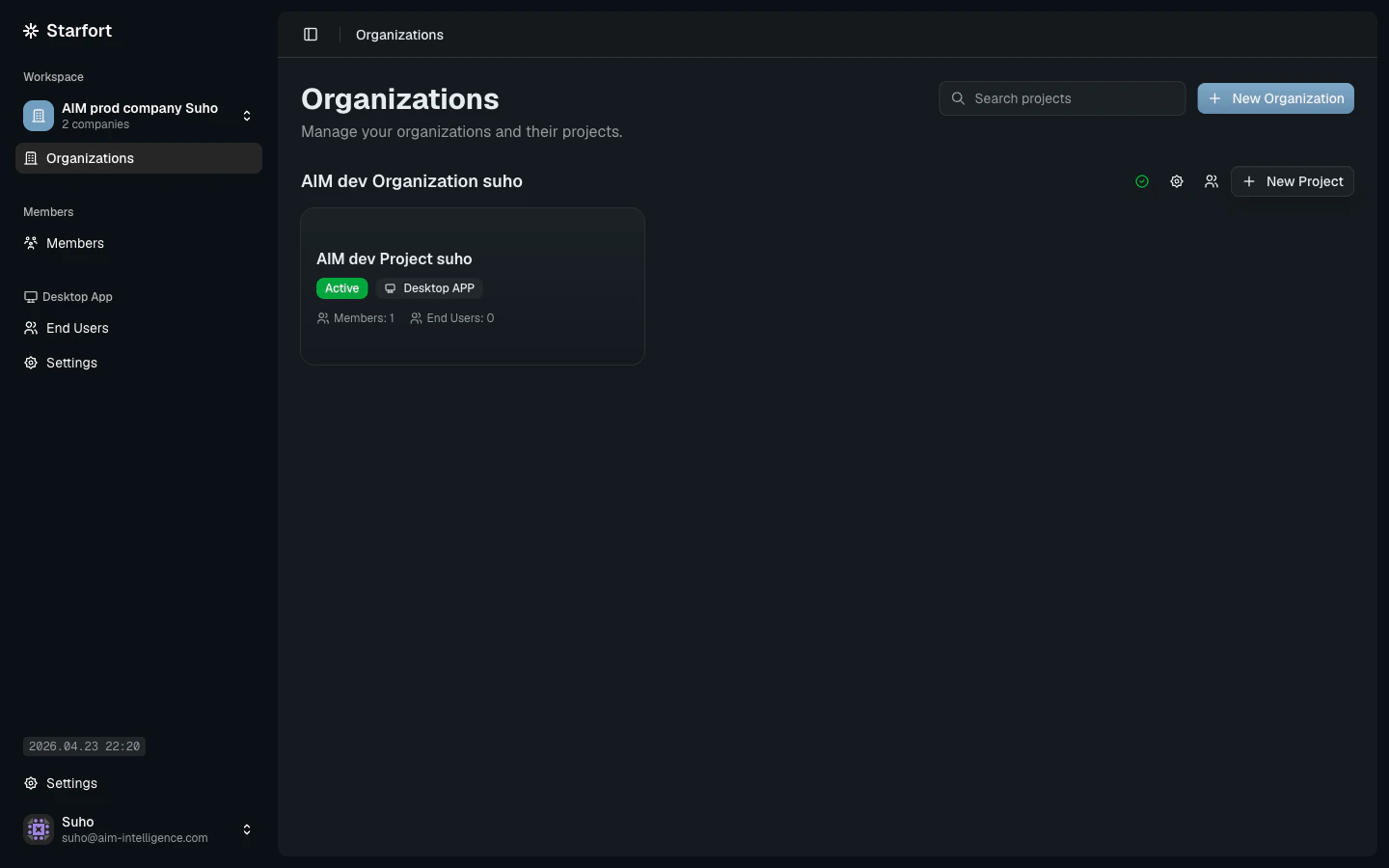
The Citadel sidebar
The left sidebar is grouped into three sections:- Workspace — active Company selector plus Organizations, where every Project lives.
- Members — company-level admins (distinct from each Project’s members).
- Desktop App — company-wide End Users and Desktop App Settings.
Open a Project
Every Project is typed eitherDesktop APP or API. Click a project card to enter its workspace, where you’ll find:
- Guardian — the active Guard API / Desktop App Guardian instance for the Project
- Policies — Guard Policies authored for the Project
- Opticon — opens monitoring for the Project in a new tab
- Assigned Users (Desktop App projects only)