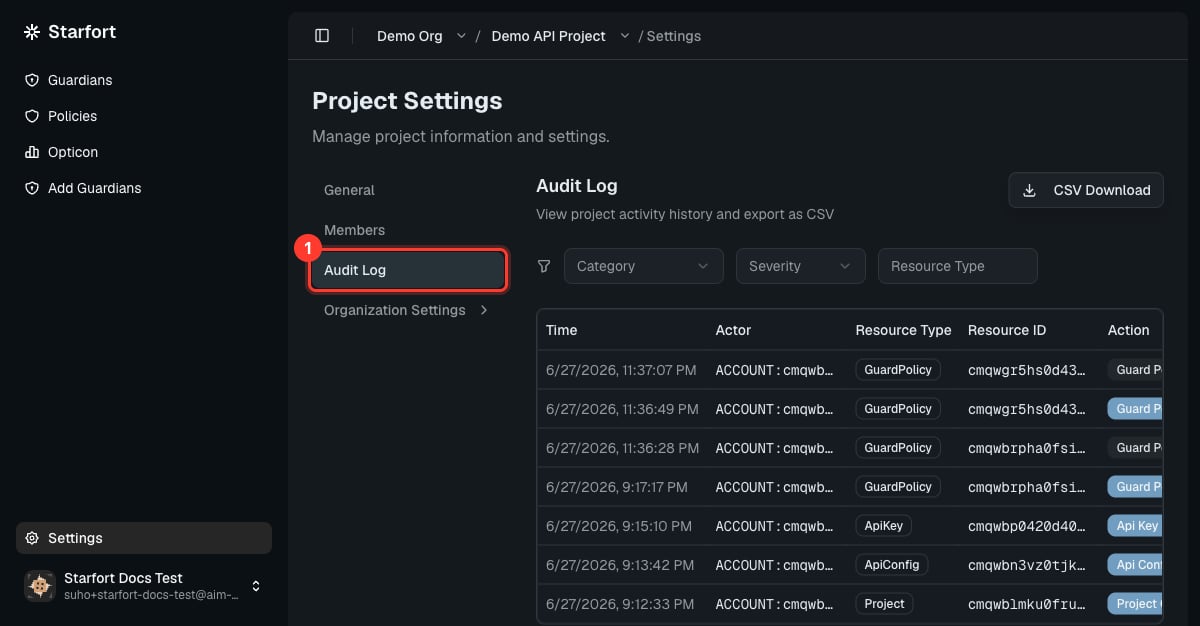
The Audit Log is an immutable record of governance changes — who changed what, and when. It is separate from Opticon, which records runtime request/response traces. Find it on a project’s Settings → Audit Log tab.
Project Settings with the Audit Log tab highlighted

What it captures

  • Resource changes — create / edit / delete / assign of organizations, projects, Guardians, policies, Control Profiles, and more.
  • Permission changes — role grants, revokes, and team invitations.
  • Setting changes — company, organization, and project settings.
  • Credential operations — API-key creation and state transitions (Active ↔ Inactive / Revoked), Desktop Agent registration.
  • Emergency actionsKill Switch on/off, Company Access Key rotation.
Each entry records the event type, the actor (account, company, role), the affected entity, before/after state where relevant, the timestamp, and the request source (IP, user agent).

What it does not capture

  • Plain reads and page navigation.
  • Token operations (issuing, expiring, refreshing JWTs).
  • Authentication and account-security events — login, logout, password change — those live in a separate security log.
  • System-automated events such as heartbeats and health checks.
Per-request content and decisions are Opticon traces, not Audit Log entries. Use the Audit Log for “who changed the configuration”, and Opticon for “what happened to this request”.

Immutability and access

Audit Log entries are immutable and kept permanently — no role, not even a platform admin, can edit or delete them. Within a company, every account can view the log regardless of role or which organizations/projects they belong to; another company’s log is never visible.